GSoC 2026: Mass Commands
Published on by Deepanshu Sahu
Category: gsoc
Coming back to Google Summer of Code for a second time has been an extremely rewarding experience. Over the past three months I worked with OpenWISP on bringing mass command execution to the platform, so that operators can manage large networks with a single operation instead of repeating the same task device by device. Along the way I explored new parts of the stack and tackled problems I had never faced before, from asynchronous execution to real-time updates in the browser. The constant guidance, encouragement, and expertise of my mentors Federico Capoano (nemesifier) and Gagan Deep (pandafy) shaped the result: their insightful feedback, patience, and supportive mentorship played a crucial role in helping me grow as a developer and a contributor to open-source projects.
About the Project
Running the same command on many devices used to be a manual task in OpenWISP: an operator had to open each device page and trigger the command one device at a time. That is acceptable for a handful of routers, but it does not scale to a real network with hundreds or thousands of devices.
The project makes this a single operation. Operators can now target devices by organization, device group and location, or pick them one by one from the device list, review the exact set of devices which will be affected, and then execute the command on all of them in the background, while following the progress of every single device in real time.
The work adds a set of enhancements to openwisp-controller: a new model with an asynchronous execution pipeline, REST API endpoints, a multi step Django admin workflow, a WebSocket endpoint for admin workflow, a WebSocket endpoint for real-time updates, and the documentation which ties everything together.
Features Implemented
The feature was built one layer at a time, each of them resting on the one before it. The model and the REST API came first, because a mass command has to exist as an object of its own before anything can be built around it: it has to remember which devices it targeted, which of them it reached, and what each of them answered, long after the request which started it is gone. Running the commands in the background with Celery came with it, since a rollout on hundreds of devices cannot happen inside the request which starts it.
The admin workflow was built on top of that foundation, turning the API into a guided flow which asks for the command, shows exactly which devices it will reach and lets the operator change that set before anything is sent. Once commands are running, the page which shows their results is fed by a WebSocket endpoint, so that a rollout can be followed while it happens instead of reloading the page. The last layer is the entry point from the device list, which hands a manual selection of devices to the very same workflow.
This is how an operator meets the feature, so it is also the order in which it is described below, starting from the browser and ending with the model and the API which make everything work. The diagram shows what happens when a mass command is started, whichever entry point it comes from.
graph TD
W[Admin wizard] --> B
S[Device list action] --> B
R[REST API] --> B
B[BatchCommand created
and queued] --> T[launch_batch_command
resolves the targets]
T --> C[Command created for
every eligible device]
T --> K[Devices which cannot run it
recorded as skipped]
C --> X[launch_command runs
each command over SSH]
X --> D[Command saved as
success or failed]
D --> A[Status of the BatchCommand
recalculated]
 K --> A
 A --> E[WebSocket event sent
to the page of the batch]
 E --> P[Results page updated
in real time]
 classDef entry fill:#dbeafe,stroke:#2563eb,color:#1e3a8a
 classDef processing fill:#fff3cd,stroke:#997404,color:#664d03
 classDef skipped fill:#f8d7da,stroke:#b02a37,color:#58151c
 classDef result fill:#d1e7dd,stroke:#0f5132,color:#0f5132
 class W,S,R entry
 class B,T,C,X,D,A processing
 class K skipped
 class E,P result
Admin Workflow
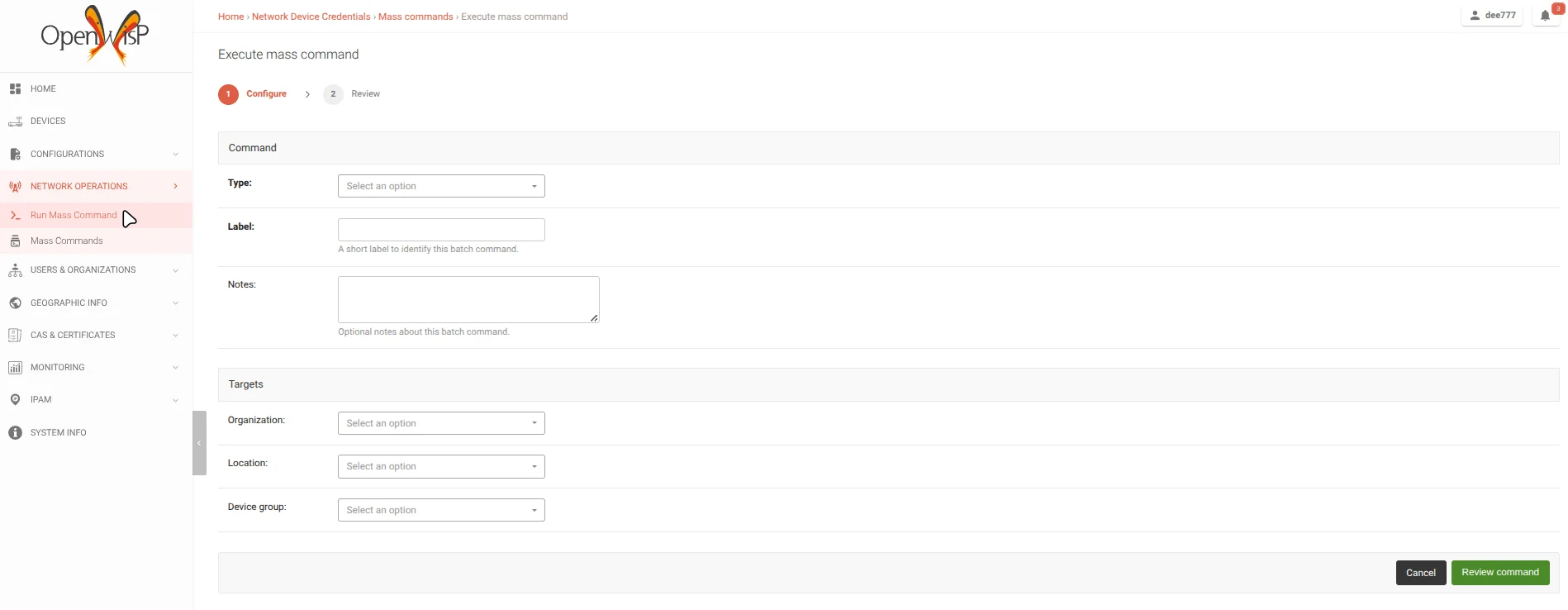
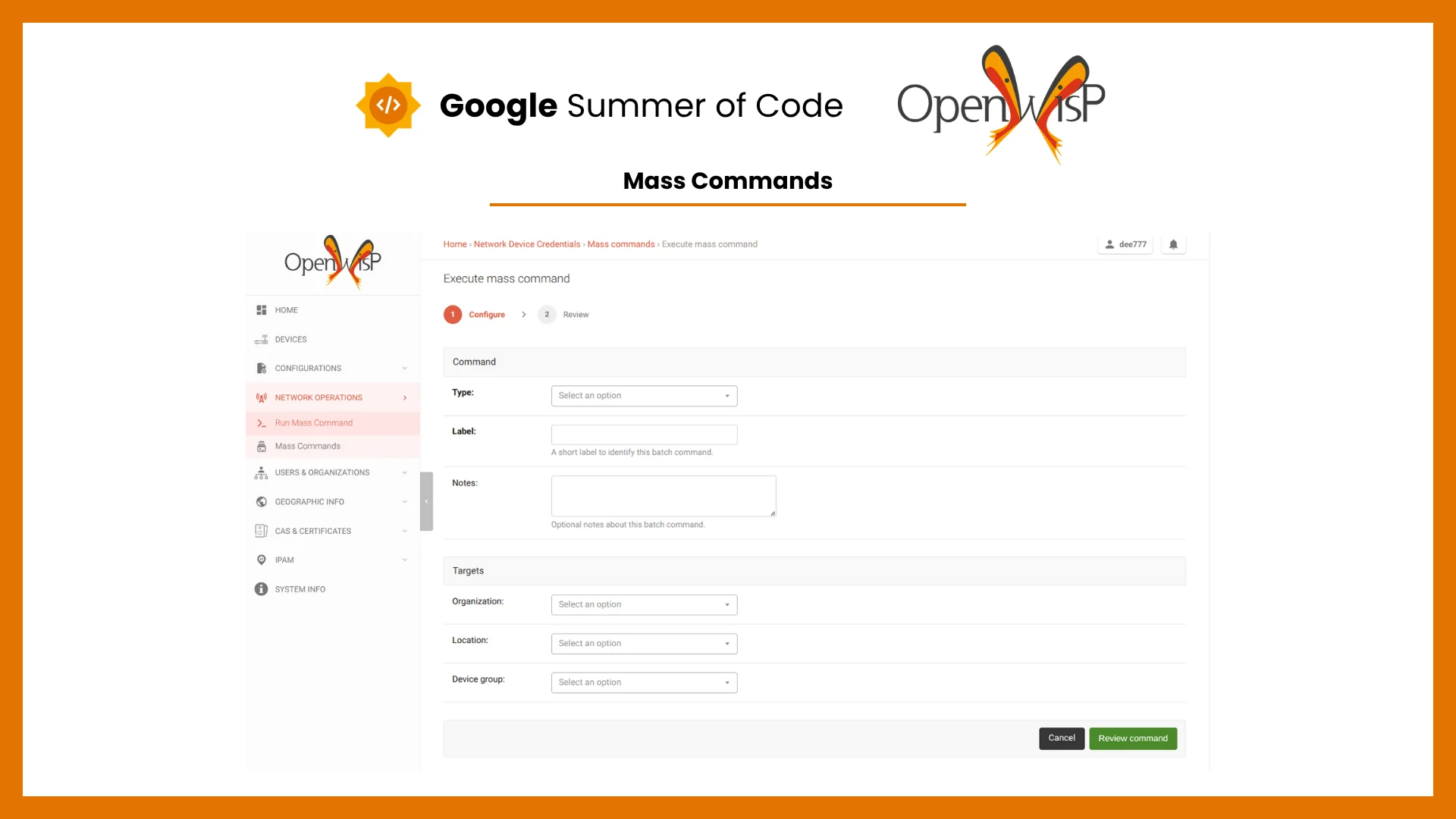
Mass commands can be sent from the browser through Network Operations > Run Mass Command. The workflow is divided in two steps.
The first step collects the command type and its inputs, which change according to the type selected, a label to identify the mass command later, optional notes, and the targets: organization, device group and location. Using more than one target narrows the selection, so a group and a location together match only the devices which are in that group and at that location. Superusers can leave every target empty to reach all the devices of the system, while other users must choose at least one target and only see the command types enabled for their organizations.
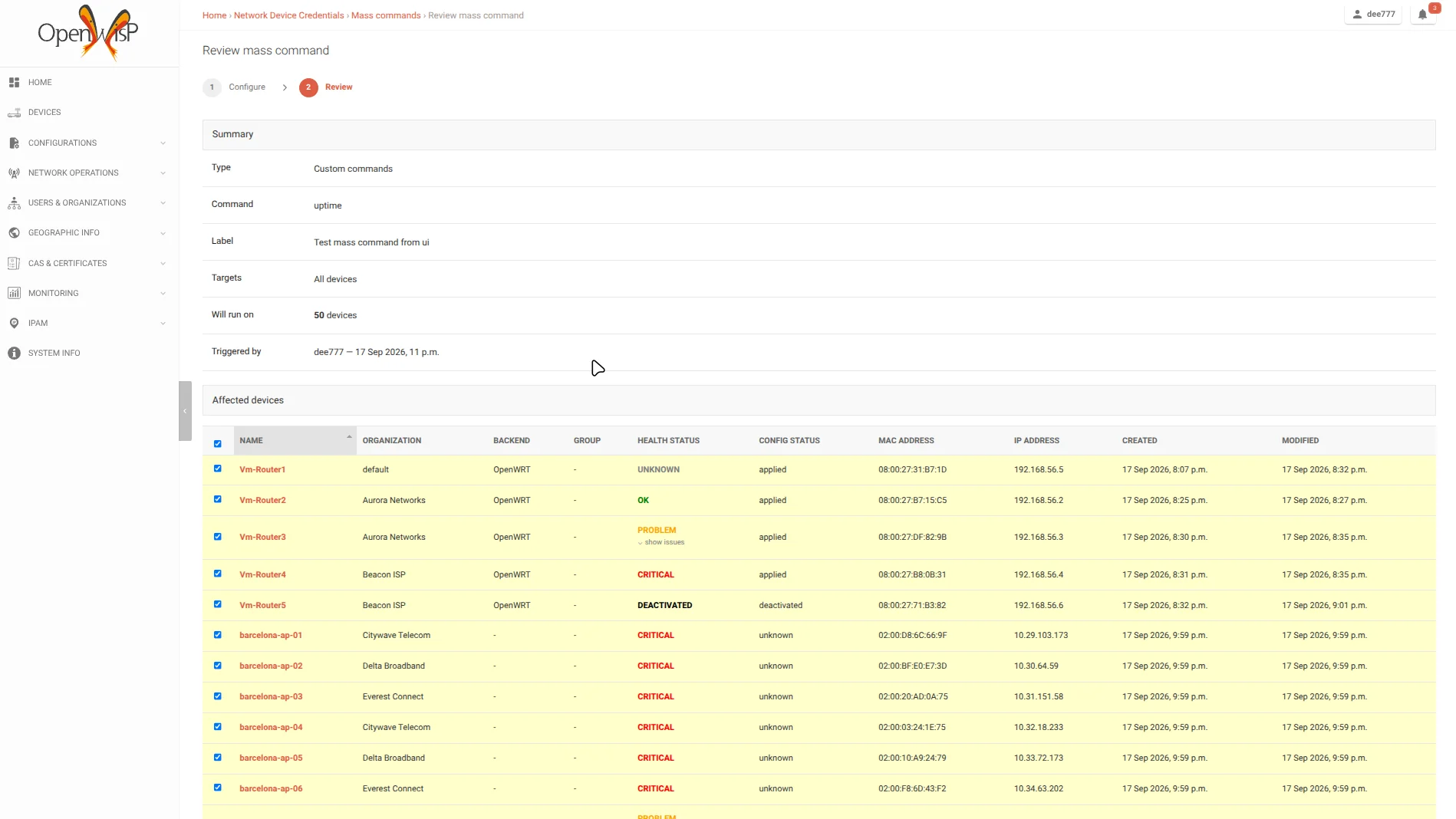
The second step shows a summary of the command together with the list of the matched devices, built with the same dry run logic used by the API. Devices can be left out by unchecking them, the counter and the Execute on N devices button follow the selection while paging through the list, and going back keeps the form filled in. The device table is composed at request time from the device admin, so columns added by other modules such as openwisp-monitoring are shown here as well.
Real-Time Monitoring
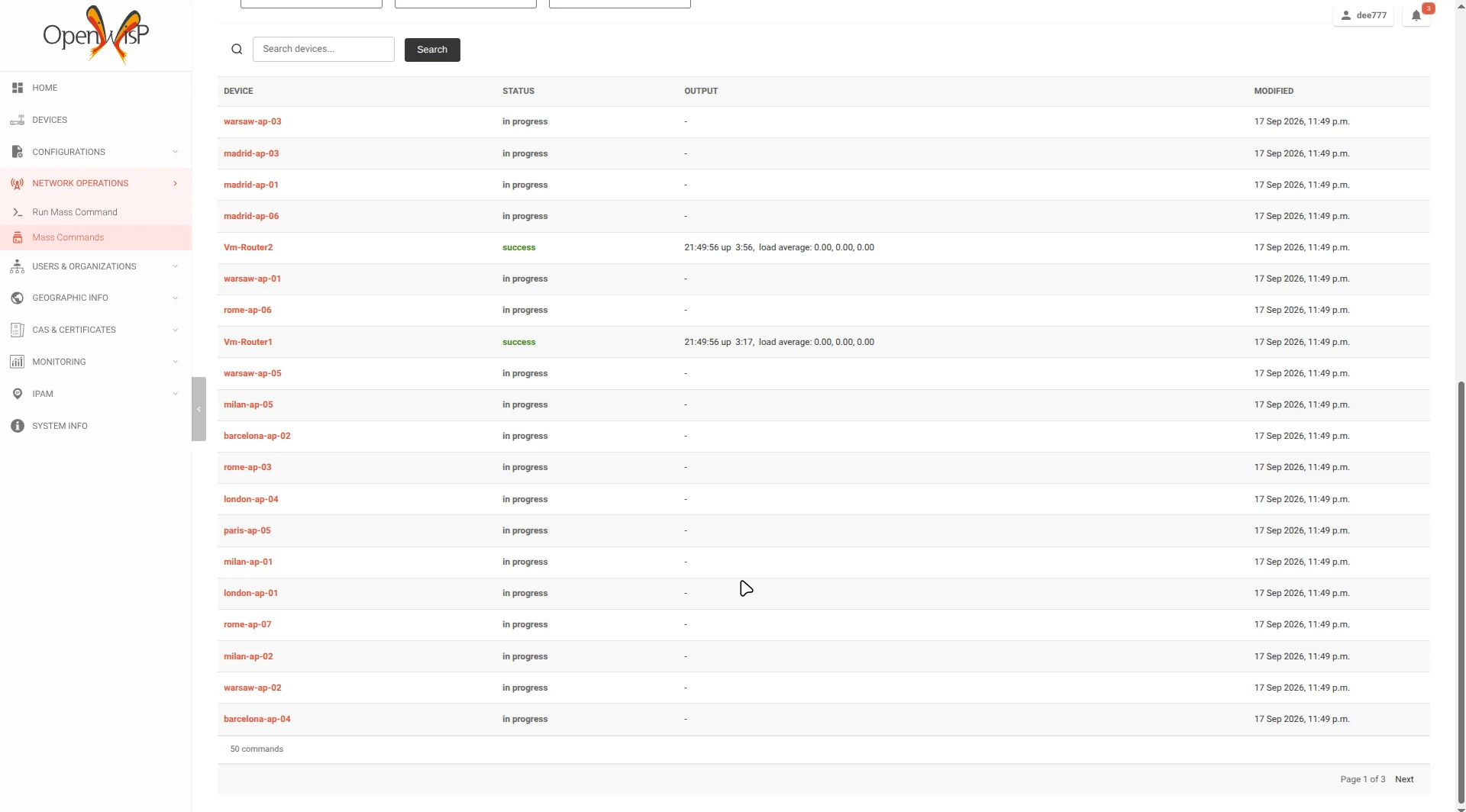
The table above was taken while a mass command was running on fifty devices: the rows which are still in progress sit next to the ones which already returned their output, and each of them switches to its final status as soon as the result arrives, without reloading the page.
Once the mass command starts, the operator lands on the mass command page, which shows the status of the batch, how many devices are affected, the skipped devices and one row per device with its status, output and last modification time.
The page is updated in real time through a new WebSocket endpoint, ws/controller/batch-command/<uuid:pk>, so there is no need to reload it to follow a rollout which affects many devices. The consumer only accepts authorized superusers and staff users who manage the organization of the mass command, and pushes two kinds of messages: one for the status of the batch and one for the result of each device. A client which connects while a mass command is already running can also request the current state and receive the results it missed, one page at a time.
The results table can be searched by device name and filtered by status, device group and location, and by organization for superusers, which makes it easy to isolate the devices which failed in a large rollout. The table also lists the devices which were skipped, that is the ones for which the command could not be created at all, for example because they have no access credentials or because the command type is not enabled for their organization: they are counted in the batch and shown with the skipped status and the reason as their output, so it is always clear why a device was not reached.
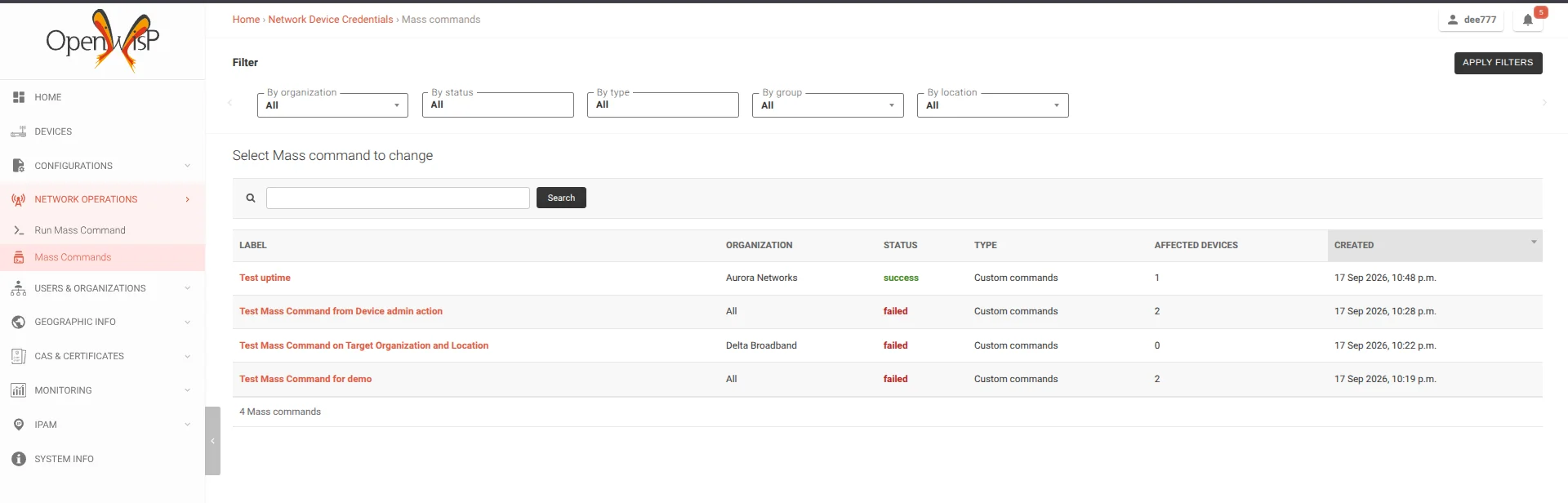
Every mass command which was sent is kept, so the list of them doubles as a history of the operations performed on the network: the label used to identify it, the organization it belongs to, its status, the type of command and how many devices it affected. The list can be searched and filtered by organization, status, type, device group and location, and opening a row leads back to the page described above.
Execution from the Device List
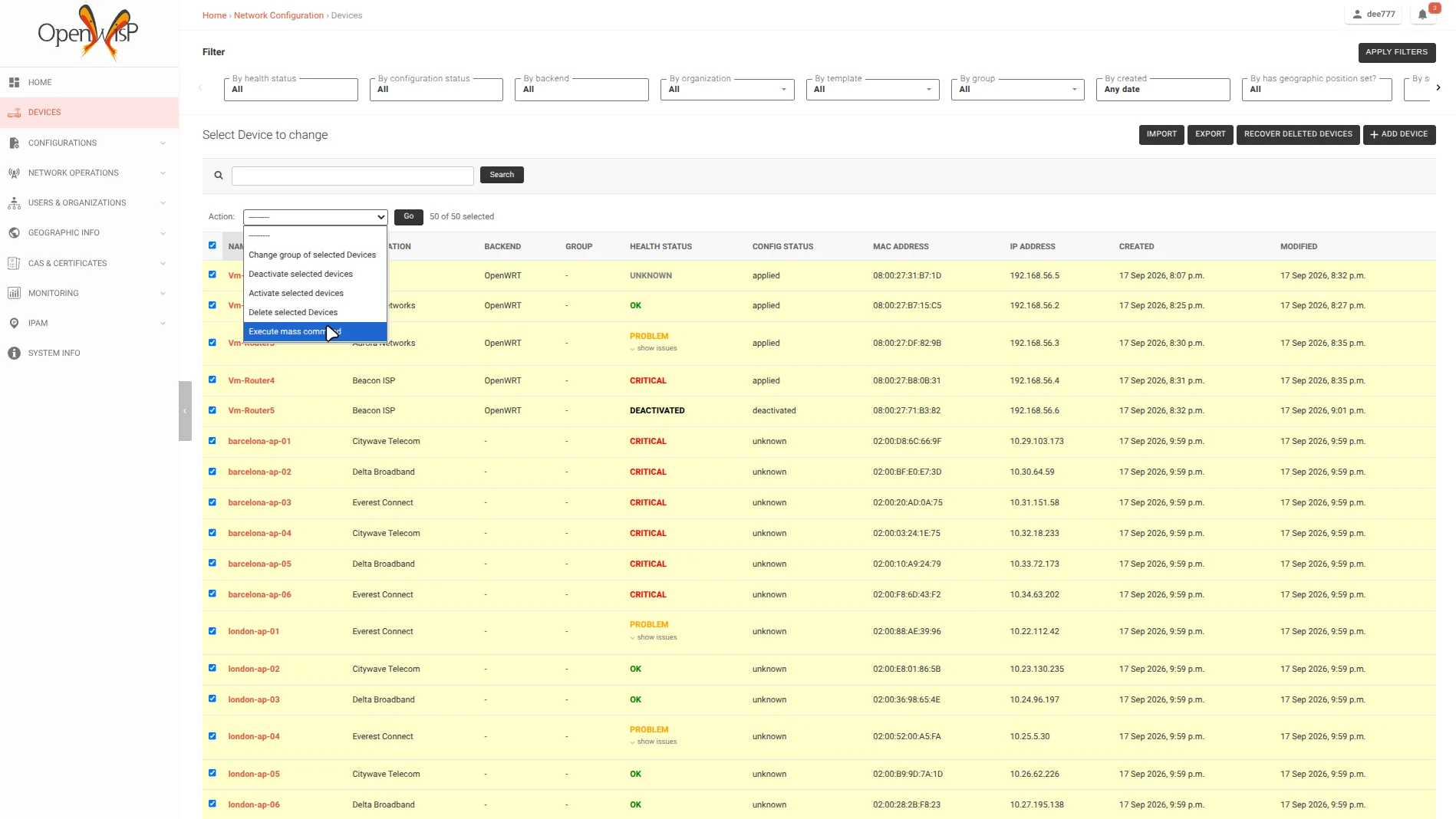
Targeting by organization, group and location covers most of the common cases, but sometimes an operator simply knows which devices need the command. For this reason an Execute mass command action was added to the device list: the selected devices are handed over to the same two step workflow, with the organization prefilled and the target fields hidden, and they can still be excluded individually in the confirmation step.
The action is only available to users who have the permission to add mass commands, and selections spanning multiple organizations are rejected, unless the command is a system wide one.
Mass Command Model and REST API
A new BatchCommand model keeps track of every mass command: its organization, status (idle, in-progress, success, failed), command type and input, the targets which were used, a label and optional notes, the devices it affects and the devices which had to be skipped. Each individual Command is linked back to the batch it belongs to, so the existing command execution machinery is reused as is.
The execution is fully asynchronous: the request creates the BatchCommand, a Celery task resolves the targets, creates one Command per eligible device, keeps the aggregated status of the batch updated and enqueues the individual commands, which are then executed over SSH. The devices for which a command cannot be created are not executed: they are recorded separately on the batch as skipped devices, together with the reason.
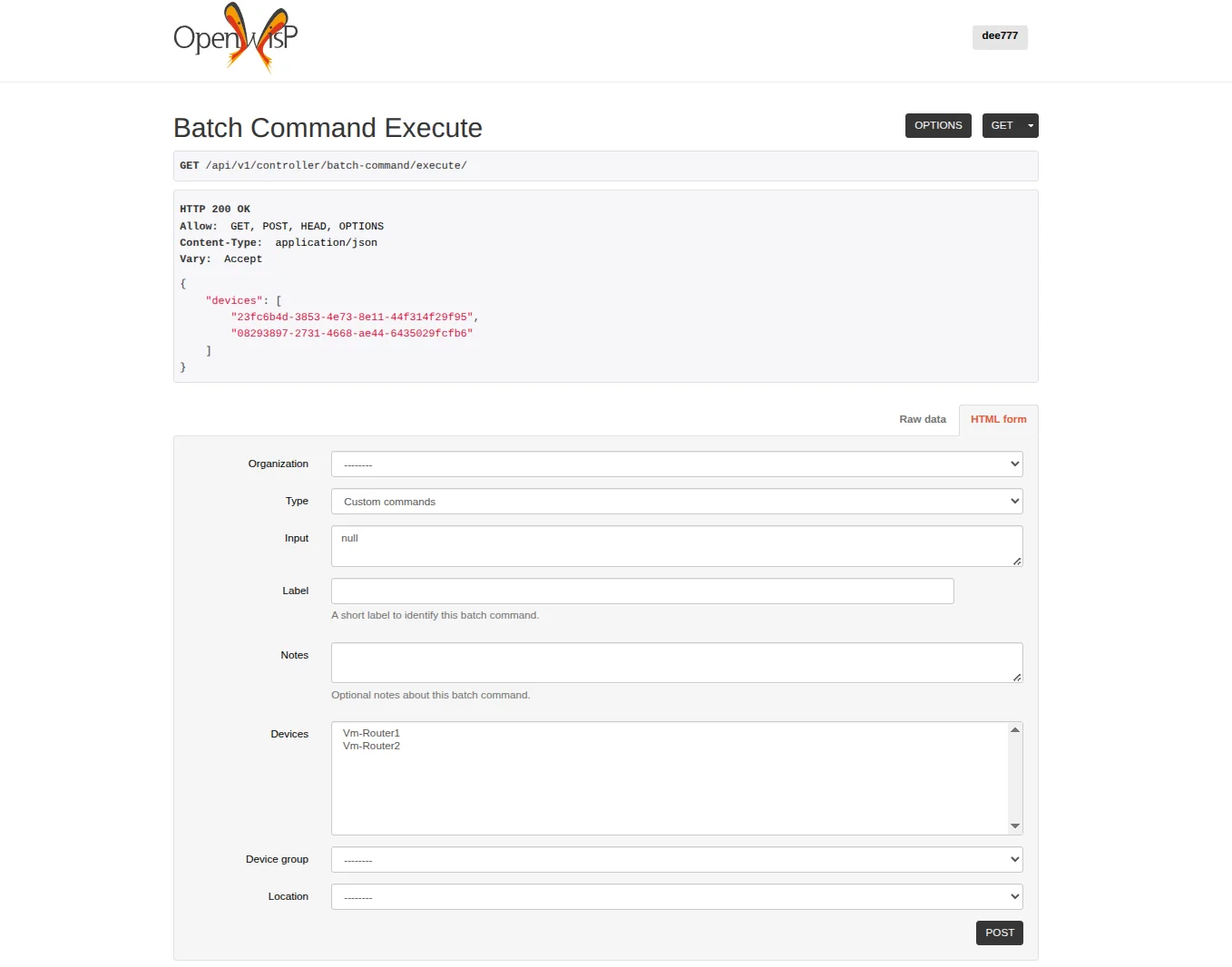
Mass commands can also be managed over the REST API, which is browsable: the endpoint above shows the dry run of a mass command, with the devices which would be affected, and the form which starts it, where the command type, its input, the label, the notes and the targets are filled in. Running a dry run, starting a mass command, listing the mass commands which were sent and reading the detail of one of them are all available over REST, while following a rollout as it happens is done through the WebSocket API. They are described in the docs/user/rest-api.rst and docs/user/websocket-api.rst documentation of the gsoc26-mass-commands branch used by the page which follows a rollout.
Current State
We are maintaining the gsoc26-mass-commands branch of openwisp-controller as the parent branch of all the mass command work. The model, the REST API, the admin workflow and the execution from the device list have all been merged into it. The feature is documented in the branch documentation, both for the admin workflow and for the REST and WebSocket APIs.
Mass commands are therefore not available in master yet: the feature branch is proposed for it in a single pull request, and once that is reviewed, tested and validated, mass commands will be released with the next version of OpenWISP.
You can follow the development process and explore the implementation details in the following pull requests.
Merged into the feature branch:
- [feature] Mass Command model and REST APIs for async command execution #1395
- [feature] Django admin workflow for mass commands with real-time monitoring #1420
- [feature] Mass command execution from the device changelist selection #1462
- [chores:ui] Added the icons of the mass command menu entries #767
- [ci] Enabled CI on gsoc26-mass-commands branch #1366
Still open:
- [feature:gsoc26] Mass Commands #1490, which brings the whole feature branch into master
My Experience
Last year's GSoC with OpenWISP was an amazing experience, and being able to do it a second time has been an absolute pleasure. Coming back to a codebase and a community I already knew allowed me to move faster, focus on the design decisions which really mattered, and take on a project which touches the whole stack, from the data model up to the user interface.
Working again with Federico Capoano (nemesifier) and Gagan Deep (pandafy) has been the most valuable part of the program. Their reviews were detailed and demanding in the best possible way: they pushed me to think about multi-tenancy and permissions, database query efficiency, idempotency of background tasks, and the small details of the user experience which make a feature actually usable in production. I learned a lot along the way, and I am well aware that there is still a lot left to learn.
The hardest parts were making the confirmation step reuse the device admin, keeping the state of the wizard consistent across steps and entry points, and making the real-time updates reliable without flooding the browser or the database. Solving these problems taught me how to break a large feature into pieces which can be reviewed and merged one at a time.
Beyond the code, taking part in the discussions of the community was once again something I genuinely enjoyed. I am looking forward to staying around and helping the community more in the coming years.
What's Next?
The next step is making mass commands more resilient to failure cases. A mass command runs on many devices at once, so failures are not the exception but a normal part of a large rollout: devices which are offline, connections which time out, background tasks which are interrupted while a batch is running. I want the feature to recover from these situations on its own and always leave the batch in a consistent state, so that an operator can trust the result of a rollout without checking device by device.
My goal is to get all the features of this project merged into the master branch of openwisp-controller, so that the mass commands feature can ship completely in the next release of OpenWISP.
Another extension of this work is the command model itself, together with its admin view. The way recent commands are exposed today comes with a number of limitations, and now that commands are also created in bulk these limitations are more visible. Reworking the model and giving it a proper admin view would make it much easier to look up what was executed on a device, when, and with which result, both for single and mass commands.
Finally, this work can benefit other modules. Mass commands are built on the same idea of batch execution used by the firmware upgrader, and the two can converge: what was learned here about targeting devices, tracking a batch and following its progress in real time can be applied there to make batch upgrades more resilient as well.
Beyond this project, I plan to keep maintaining what I built during both editions of the program, fixing bugs, reviewing contributions and helping new contributors onboard. Open source has given me a lot over these two years, and I intend to keep giving back to the OpenWISP community for a long time.