GSoC 2026: Automatic Extraction of OpenWrt Firmware Image Metadata
Published on by Mohammed Atif
Category: gsoc
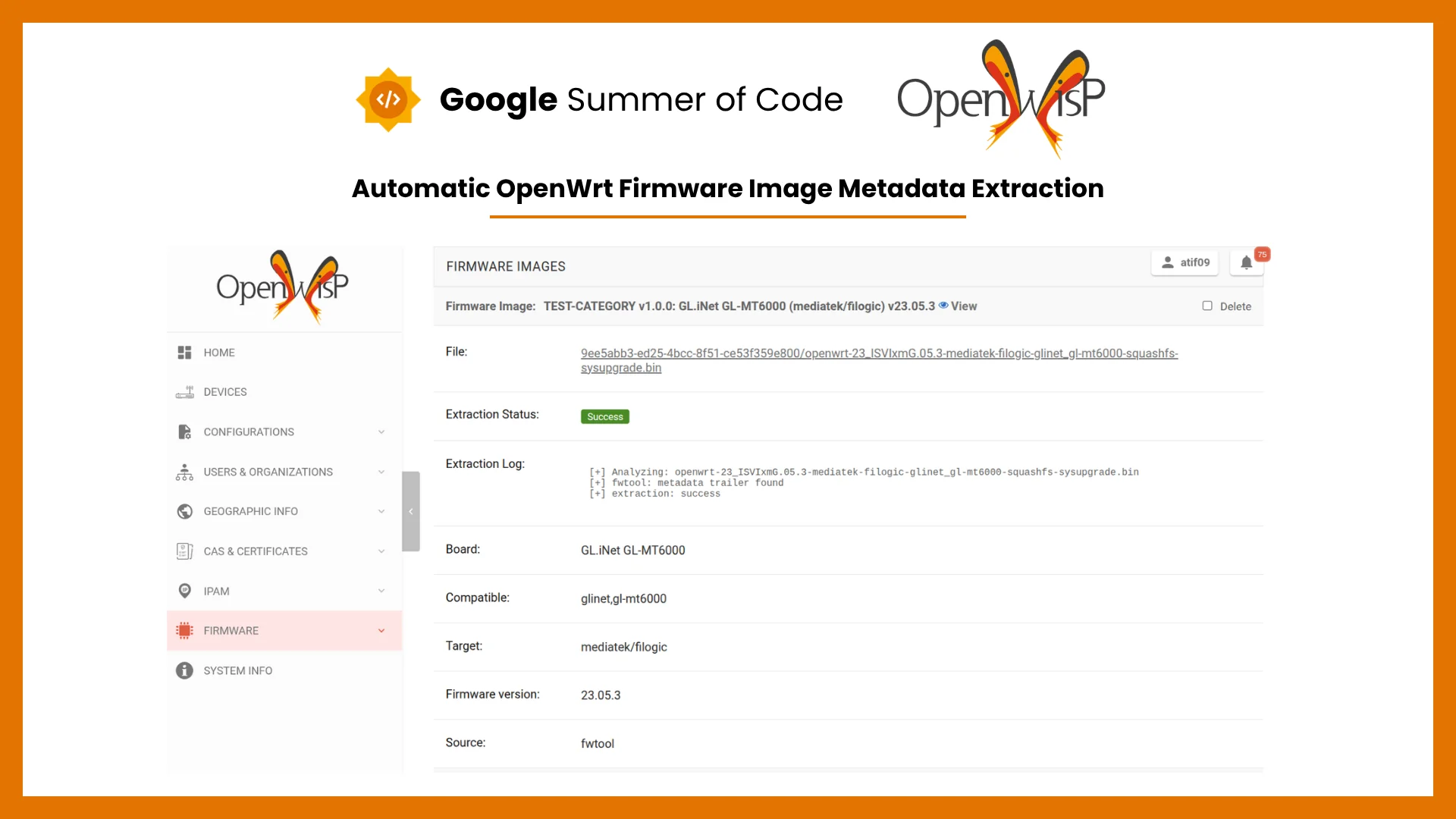
Still feels unreal sometimes that I got to work with OpenWISP during Google Summer of Code. These past 5 months have taught me a lot about how many things go into a project of this scale, and how much a single review comment can teach you. I am grateful to my mentors, Federico Capoano (nemesifier), Alexandre Vincent (asmodehn), and Sankalp (codesankalp), for their insightful feedback and, most importantly, their patience in helping me through the learning curve of understanding firmware images and OpenWrt's internals.
I had an amazing time working on the OpenWISP Firmware Upgrader module, where I implemented the automatic extraction pipeline for OpenWrt firmware image metadata, which helped me understand how OpenWrt images are structured far more deeply than I expected going in.
About the Project
Previously, when a firmware image was uploaded to openwisp-firmware-upgrader, the admin had to manually enter important metadata. This was obviously a tedious task in a lot of cases and error prone, and the module also relied on a manually maintained lookup table, hardware.py, mapping image filenames to a static list of compatible boards. This worked while the number of supported OpenWrt targets was small, but it does not scale: every new device or firmware naming convention meant a manual code change, and the map could go stale as OpenWrt's own hardware support evolved.
This project replaces that manual overhead with automatic metadata extraction, reading the information directly from the firmware file itself at upload time.
The Old Approach and Its Limits
The data structure in hardware.py worked as a static map, where each entry mapped an OpenWrt image type string to the list of device boards it supported. When an admin uploaded a firmware image, the module looked up its filename pattern in this map as the sole source of truth for which devices it could pair with.
Some limits of this approach became clearer as the project progressed:
- Every new OpenWrt target or renamed image type required a manual pull request to update the map
- There was no way to verify the map was still accurate against the actual firmware files it described
- Custom, self-hosted deployments with their own device catalogs had to maintain their own separate mapping, duplicating the same maintenance burden
- The map was keyed by filename, and its board identifiers were almost entirely human-readable labels rather than the device-tree-compatible strings modern OpenWrt firmware actually embeds, with no systematic path toward using them
- Pairing itself was opaque: if a filename didn't match any entry in the map, or a device's model wasn't listed against it, the image simply never paired with that device, with no status field or log explaining why, an admin had to already know the map's contents to debug it
- Since pairing was filename-pattern matching rather than anything read from the file, a correctly-working firmware image could fail to pair purely because it was renamed or didn't match the expected naming convention
These limits are what motivated moving metadata extraction to the firmware file itself, covered next.
Features Implemented
The Automatic Metadata Extraction Pipeline
%%{init: {"theme": "base", "themeVariables": {
  "lineColor": "#8b949e", "textColor": "#1f2933", "nodeTextColor": "#1f2933",
  "edgeLabelBackground": "#f1f3f5"
}, "flowchart": {"nodeSpacing": 40, "rankSpacing": 60}}}%%
flowchart TB
     A["Read fwtool metadata"] -->|"Unsupported input"| B["Stop without metadata"]
     A -->|"No trailer"| C["Use DTB result"]
     A -->|"Trailer too large"| C
     A -->|"Success"| D["Check DTB model"]
     D -->|"Better model found"| E["Use DTB model"]
     D -->|"No model found"| F["Use fwtool result"]
     E --> G["Return result"]
     F --> G["Return result"]
     C --> G

     classDef entry fill:#dbeafe,stroke:#2563eb,color:#1e3a8a,font-weight:bold
     classDef active fill:#ed7800,stroke:#b35b00,color:#ffffff,font-weight:bold
     classDef waiting fill:#fff1e0,stroke:#ed7800,color:#1f2933,font-weight:bold
     classDef success fill:#2f855a,stroke:#276749,color:#ffffff,font-weight:bold
     classDef failure fill:#c53030,stroke:#9b2c2c,color:#ffffff,font-weight:bold
     class A entry
     class B failure
     class C,D waiting
     class E,F active
     class G success
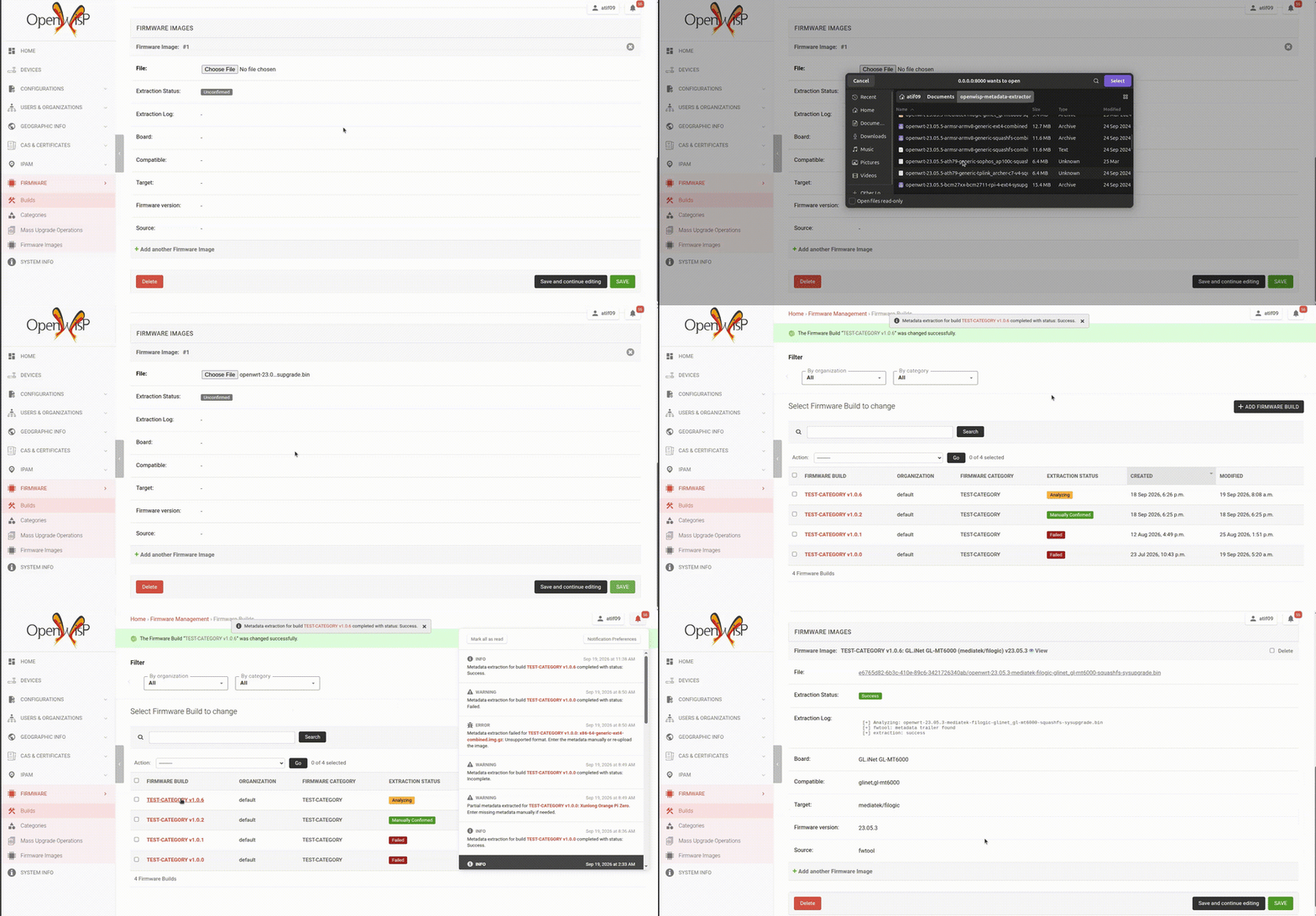
Most OpenWrt sysupgrade images are built with fwtool, which appends a small trailer of JSON metadata to the end of the image file: the board identifier, the target, the firmware version, and the list of devices the image supports. Extraction looks for this trailer first, since it's the most direct and reliable source when it's present, no guessing or pattern-matching required, the image describes itself.
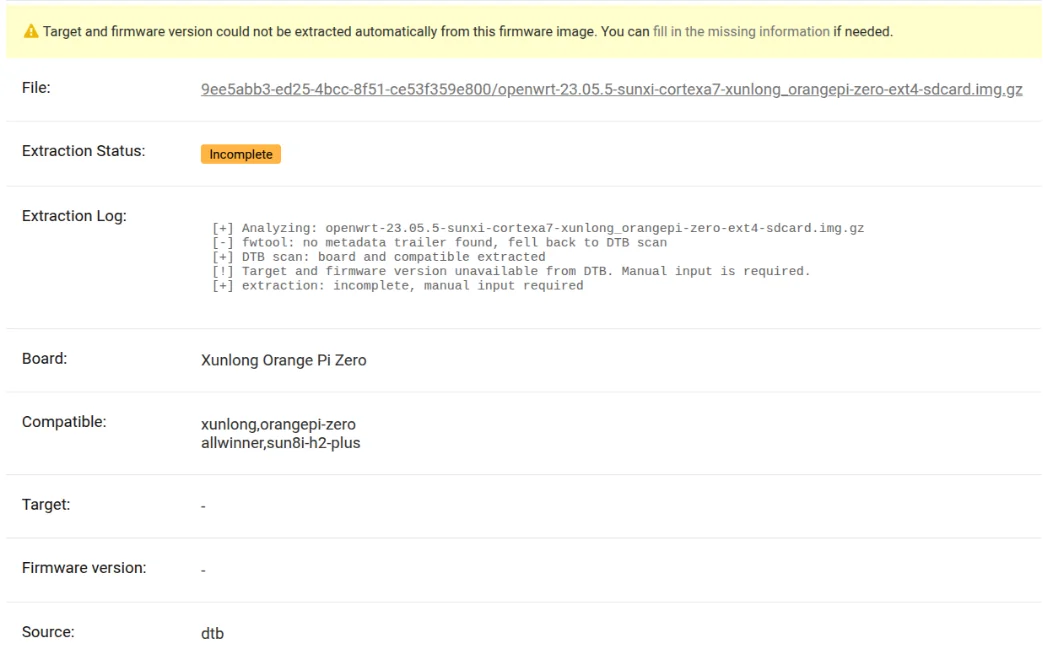
Not every image carries an fwtool trailer, and some are compressed in ways that make locating it unreliable. For these cases, extraction falls back to scanning the image for an embedded DTB, the same structure the Linux kernel uses at boot to describe the hardware it's running on. A DTB carries model and compatible properties that identify the board just as directly, just from a different part of the image. Even when fwtool succeeds, a DTB scan still runs afterward, since it can confirm or override the model with a more precise, human-readable name than the raw identifier fwtool provides on its own.
The Extraction State Machine
%%{init: {"theme": "base", "themeVariables": {
  "lineColor": "#8b949e", "textColor": "#1f2933", "nodeTextColor": "#1f2933",
  "edgeLabelBackground": "#f1f3f5"
}, "flowchart": {"subGraphTitleMargin": {"top": 16, "bottom": 16}, "nodeSpacing": 40, "rankSpacing": 60}}}%%
flowchart TB
    subgraph Statuses["extraction_status"]
        direction TB
        s1["unconfirmed"]
        s2["in_progress"]
        s3["failed"]
        s5["invalid"]
        s4["incomplete"]
        s6["success"]
        s7["manually_confirmed"]
    end

    subgraph Capabilities["What it unlocks"]
        direction TB
        c0["No functionality yet"]
        c3["Can be manually confirmed"]
        c1["Eligible for device pairing"]
        c2["Locked: fields uneditable"]
    end

    s1 --> c0
    s2 --> c0
    s3 --> c3
    s5 --> c3
    s4 --> c3
    s4 --> c1
    s6 --> c1
    s6 --> c2
    s7 --> c1
    s7 --> c2

    classDef entry fill:#dbeafe,stroke:#2563eb,color:#1e3a8a,font-weight:bold
    classDef active fill:#ed7800,stroke:#b35b00,color:#ffffff,font-weight:bold
    classDef waiting fill:#fff1e0,stroke:#ed7800,color:#1f2933,font-weight:bold
    classDef success fill:#2f855a,stroke:#276749,color:#ffffff,font-weight:bold
    classDef failure fill:#c53030,stroke:#9b2c2c,color:#ffffff,font-weight:bold
    classDef stopped fill:#4a5568,stroke:#2d3748,color:#ffffff,font-weight:bold
    class s1 entry
    class s2 active
    class s3,s5 failure
    class s4 waiting
    class s6,s7 success
    class c0,c2 stopped
    class c1 success
    class c3 waiting
Several new fields on FirmwareImage carry the result of extraction:
- board, the identifier used to pair the image with a device, replacing the old hardware-map lookup
- compatible, the fuller list of DTB-style identifiers an image supports
- target, the OpenWrt target platform the image was built for
- fw_version, the firmware version extracted from the image, shown whenever it differs from the build's own version
- compat_version, an internal compatibility marker that blocks device pairing outright when it exceeds 1.0, independent of extraction_status
- source, recording which method produced the metadata, fwtool, dtb, manual, or (for images migrated from before this feature existed) the legacy hardware map, built-in or custom, so an admin can tell at a glance how much to trust a given value
- extraction_status, tracking the image through the pipeline shown below, backed by a failure_reason and a full extraction_log for the details
Only success, manually_confirmed, and incomplete images are eligible for device pairing. success and manually_confirmed additionally lock the metadata fields from further edits, while failed, incomplete, and invalid images can be corrected by hand at any time. Rather than an image silently failing to pair with any device and leaving the admin to guess why, the status, reason, and log make the cause visible directly in the admin interface.
Safety Guards in the Extraction Pipeline
%%{init: {"theme": "base", "themeVariables": {
  "lineColor": "#8b949e", "textColor": "#1f2933", "nodeTextColor": "#1f2933",
  "edgeLabelBackground": "#f1f3f5"
}, "flowchart": {"subGraphTitleMargin": {"top": 16, "bottom": 16}, "nodeSpacing": 40, "rankSpacing": 60}}}%%
flowchart TB
    subgraph Reject["Reject"]
        direction TB
        A["Upload received"] --> B{"Bad file type?"}
        B -- Yes --> X["failed: unsupported type"]
    end

    subgraph SizeGuard["Size Limits"]
        direction TB
        C{"Raw file too large?"}
        C -- Yes --> Y["failed: decompression limit"]
        C -- No --> D["Decompress"]
        D -- Cap tripped --> Y
    end

    subgraph Scan["Scanning"]
        direction TB
        E["Scan fwtool trailer"] --> F["Fallback: DTB scan"]
        F --> G["Return result"]
        E -- Too large --> Y
    end

    B -- No --> C
    D -- OK --> E

    classDef entry fill:#dbeafe,stroke:#2563eb,color:#1e3a8a,font-weight:bold
    classDef active fill:#ed7800,stroke:#b35b00,color:#ffffff,font-weight:bold
    classDef waiting fill:#fff1e0,stroke:#ed7800,color:#1f2933,font-weight:bold
    classDef success fill:#2f855a,stroke:#276749,color:#ffffff,font-weight:bold
    classDef failure fill:#c53030,stroke:#9b2c2c,color:#ffffff,font-weight:bold
    class A entry
    class B,C waiting
    class D,E,F active
    class X,Y failure
    class G success
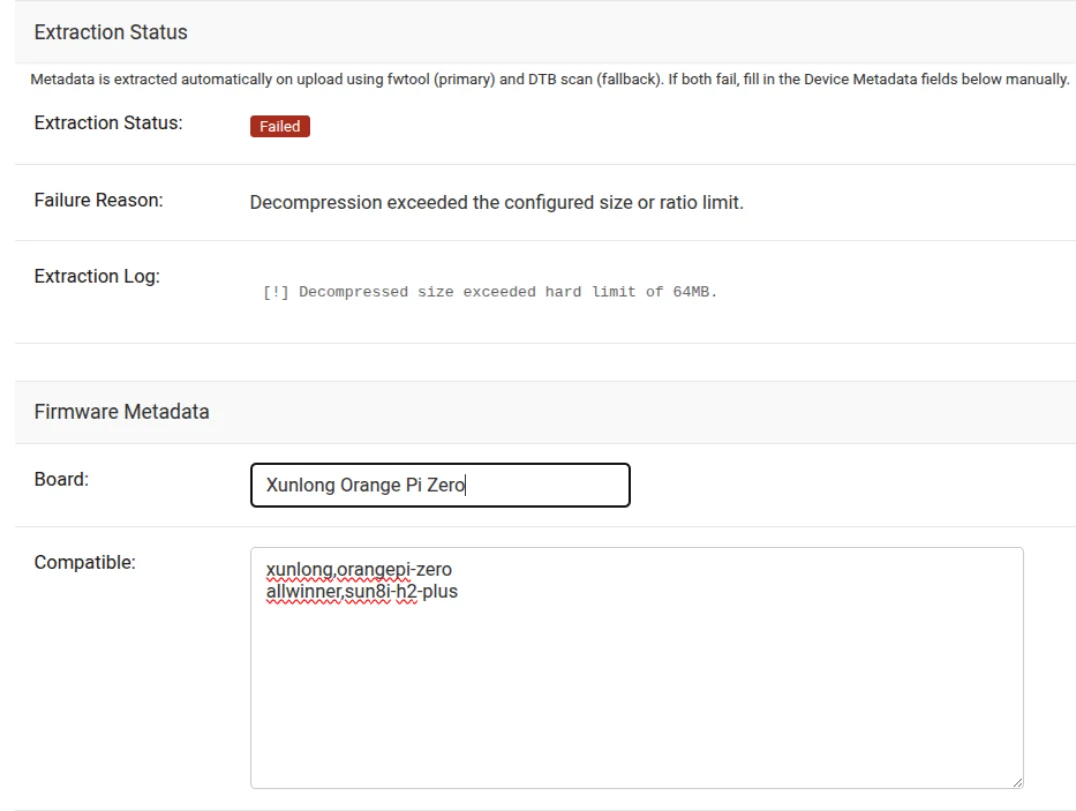
Firmware uploads are untrusted binary input, so the extraction pipeline enforces limits at every stage, not just one. The raw file size is capped before it's even copied into a working file, decompressed size and compression ratio are capped during actual decompression to block decompression-bomb-style uploads, and a separate cap on the fwtool trailer's claimed metadata size stops an oversized JSON payload from being parsed even after it passes checksum validation. On top of the size limits, the number of trailer probes, CRC computations, and DTB scan attempts are all bounded too, so a file crafted with many fake trailers or DTB-like magic bytes can't force excessive CPU work by itself. Certain image types are rejected upfront by filename, before any parsing happens at all. Finally, the whole task carries its own soft time limit as a backstop, in case something still runs long despite every guard above.
Tripping the raw file size cap, the upfront filename rejection, the task's own time limit, or the decompression cap during a full DTB fallback marks the image failed with a specific reason in the log. The trailer size, probe, and DTB scan limits behave differently: hitting one of them just makes that step give up and fall through to whatever comes next in the pipeline, so if DTB still finds a board afterward, the image ends up incomplete rather than failed.
Recovering from Extraction Failures
%%{init: {"theme": "base", "themeVariables": {
  "lineColor": "#8b949e", "textColor": "#1f2933", "nodeTextColor": "#1f2933",
  "edgeLabelBackground": "#f1f3f5"
}, "flowchart": {"subGraphTitleMargin": {"top": 16, "bottom": 16}, "nodeSpacing": 40, "rankSpacing": 60}}}%%
flowchart TB
    subgraph Q["queue_unconfirmed_extractions"]
        direction TB
        Q1["Celery Beat (periodic)"]
        Q2["Worker startup (deduped)"]
        Q3["Find all unconfirmed images"]
        Q4["Queue extraction"]
        Q1 --> Q3
        Q2 --> Q3
        Q3 --> Q4
    end

    subgraph R["reclaim_stale_extractions"]
        direction TB
        R1["Celery Beat (periodic)"]
        R2["Find in_progress images past timeout"]
        R3["Mark failed: timeout"]
        R1 --> R2
        R2 --> R3
        R1 -.-> RC["Not scheduled? Django system check warns"]
    end

    Q4 --> Q5["Back into the pipeline:
in_progress"]
    R3 --> R4["Just another failed image:
can be confirmed manually"]

    classDef entry fill:#dbeafe,stroke:#2563eb,color:#1e3a8a,font-weight:bold
    classDef active fill:#ed7800,stroke:#b35b00,color:#ffffff,font-weight:bold
    classDef waiting fill:#fff1e0,stroke:#ed7800,color:#1f2933,font-weight:bold
    classDef failure fill:#c53030,stroke:#9b2c2c,color:#ffffff,font-weight:bold
    class Q1,Q2,R1 entry
    class Q3,Q4,Q5,R2 active
    class R3 failure
    class R4,RC waiting
Extraction runs in the background via Celery, and the background workers can fail in ways ordinary exception handling can't catch: a worker killed by an out-of-memory condition, or one that hits a hard time limit configured at the deployment level (beyond this package's own soft limit), both leave affected images stuck in progress indefinitely, with nothing coming back to retry it.
Two tasks handle recovery: reclaim_stale_extractions finds images stuck in progress past a configurable timeout and marks them failed so they can be manually re-extracted or corrected, and queue_unconfirmed_extractions picks up any image still sitting unconfirmed and queues it for extraction. The second one also runs automatically every time a worker starts, so images left unconfirmed after a deploy or a crash get requeued without anyone noticing, guarded by a short-lived cache lock so multiple workers restarting together don't all queue the same backlog at once.
An admin doesn't have to wait for the periodic reaper either: selecting a stuck in_progress image and running the bulk re-extract action forces an immediate reset and retry, safely, since a stray old task's result is silently discarded once a fresh claim has replaced it.
Both tasks are idempotent and safe to run concurrently with themselves, so the recommended setup schedules them periodically via Celery Beat. reclaim_stale_extractions specifically is checked by a Django system check, since it has no other trigger, if it's missing from your CELERY_BEAT_SCHEDULE, you'll see a warning in your deployment logs. queue_unconfirmed_extractions isn't checked the same way, since the worker-startup trigger already covers it as a fallback. One more thing worth getting right: the stale-claim timeout must be set to at least the task's own time limit, otherwise the reaper can mark a still-running extraction as failed before it's actually had a chance to finish.
This isn't just cleanup: a build's mass upgrade is blocked entirely if even one of its images is still unconfirmed, in progress, failed, or invalid, so a single stuck extraction can hold up an entire rollout until it's recovered.
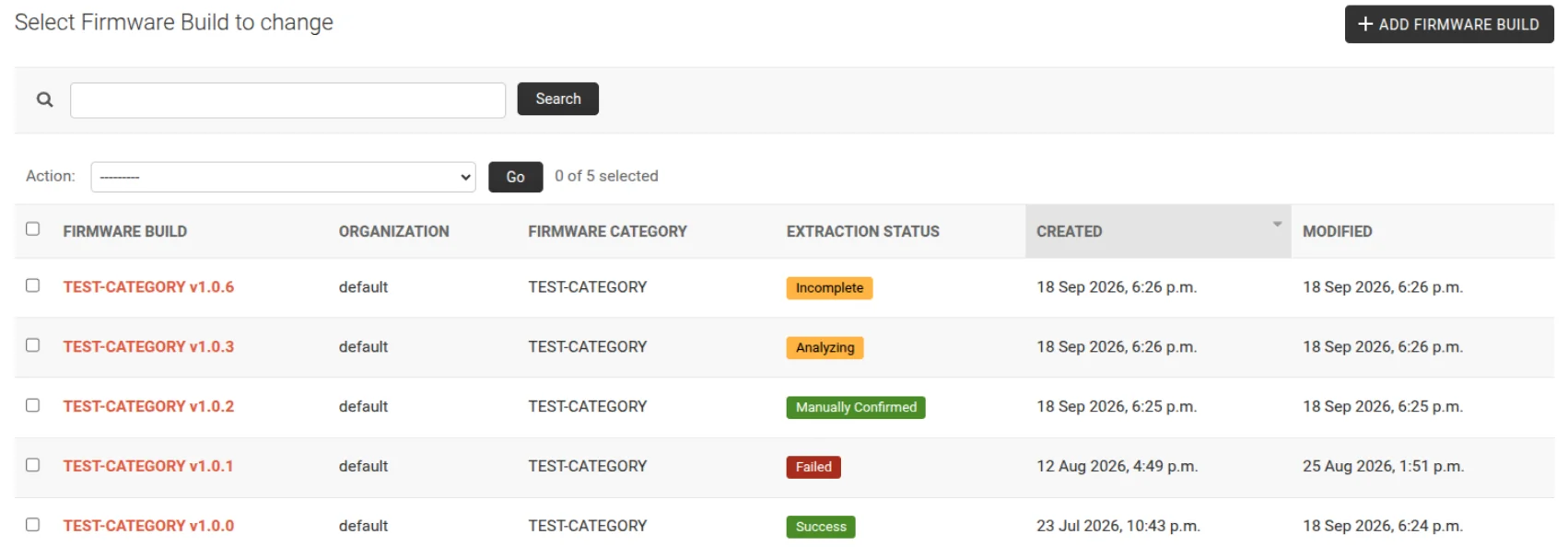
Each build also carries its own aggregate extraction status, rolled up from every image that belongs to it. Adding a new image to a build, or re-extracting any of its images, sets the build back to analyzing immediately, even if it had already reached a final status before. Once every image resolves again, the worst outstanding state wins, invalid, then failed, then incomplete, then manually confirmed, and the build only shows success once every one of its images is success itself, a single manually confirmed image keeps the whole build at manually confirmed even if every other image succeeded outright.
Admin Workflow: Manual Confirmation and Bulk Re-extraction
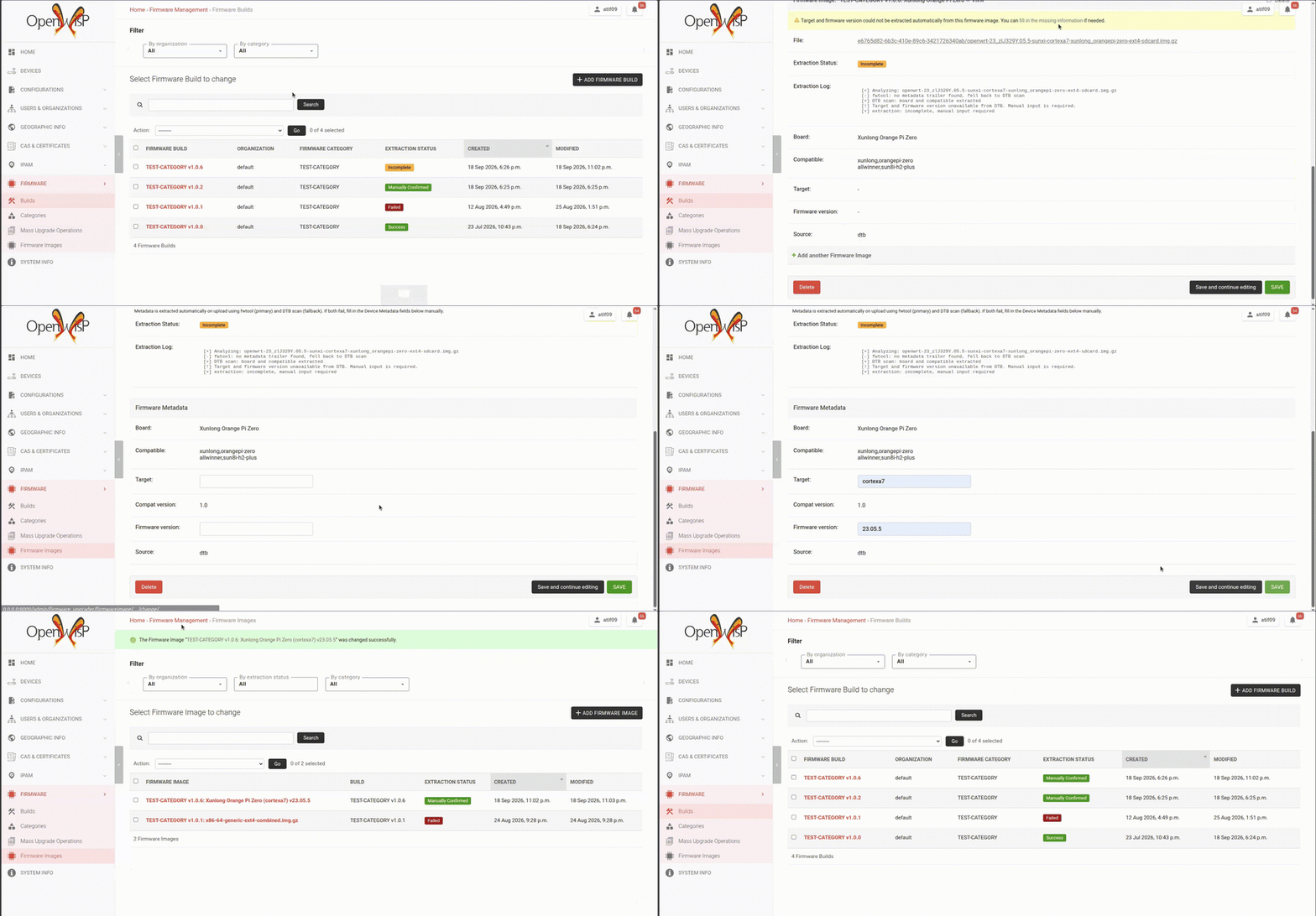
When an extraction fails, or comes back incomplete, an admin can fill in the missing metadata by hand directly in the change form. If DTB was the only source (fwtool found nothing), board and compatible are already locked, only target and fw_version need filling in; if fwtool found a board that DTB never confirmed, board and compatible stay editable too. Saving confirms the image automatically, as long as board isn't empty, extraction status moves to 'Manually Confirmed' and the build's status updates to reflect it, without a separate confirm step. Leaving board empty shows a warning instead, and the image keeps its current status.

A bulk Re-extract metadata action is also available for images where the underlying file changed or extraction needs to be retried. It skips, and reports skipping, several categories of images so it can never undo a working state:
- images with an upgrade operation currently in progress
- images already locked (success or manually confirmed)
- images marked incomplete, since re-extraction wouldn't recover what's missing, they need manual input instead
- images already assigned to a device
Device Pairing via board
An image only becomes eligible for pairing once its extraction_status reaches success, manually_confirmed or incomplete, images still unconfirmed, mid-extraction, or failed are excluded, so a device can never be paired to metadata that hasn't been verified. Pairing itself is an exact match: device.model == image.board. Once an image reaches success or manually_confirmed, its metadata fields are locked and can no longer be edited, protecting a working pairing from being silently invalidated.
How it works:
- Make sure the extraction status of your firmware image is one of the following: Success, Manually Confirmed, or Incomplete.
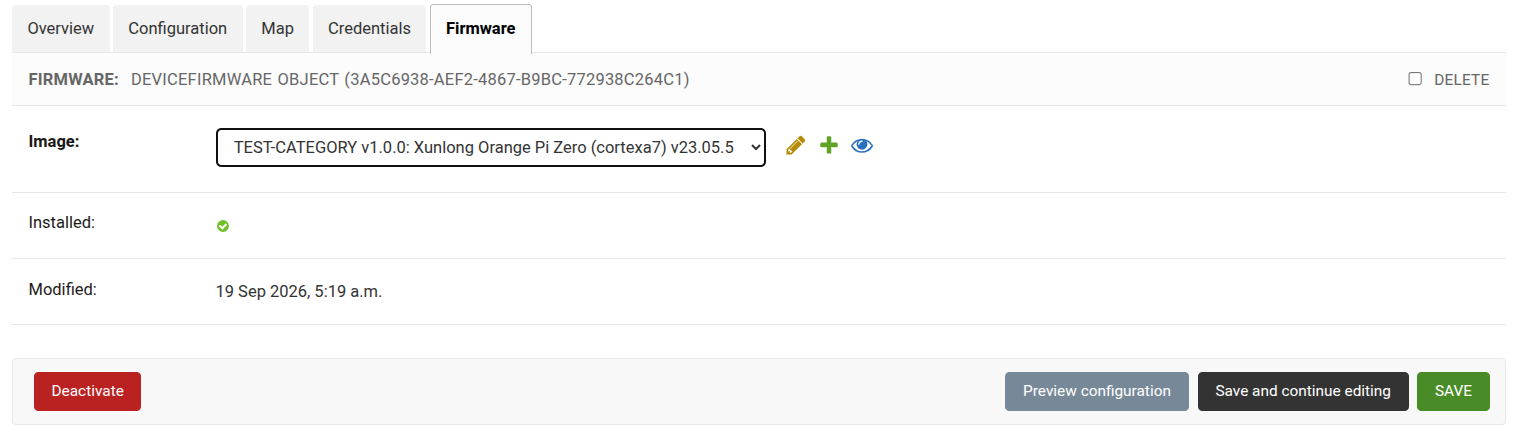
- Go to Devices, create a device and fill in the required fields, set up credentials and then click on Save (make sure the Model field on the device page matches the Board field you see in the firmware inline)
- Go to the Firmware tab on the Device page and you will see the drop down populated with the firmware image
REST API Support
Extraction-derived fields (extraction_status, failure_reason, source, and similar) are always read-only through the API. board, compatible, target, and fw_version are read-only too, but only while the image's status keeps them locked in the admin, on creation, or while success, manually_confirmed, unconfirmed, or in_progress. PATCH-ing those fields on a failed, invalid, or incomplete image writes them and confirms the image automatically, as long as the resulting board isn't empty, otherwise the whole request fails validation and nothing is saved, the same workflow available in the admin, so automation scripts and integrations can do it too, not just the browser.
Migrating Away from the Static Hardware Map
%%{init: {"theme": "base", "themeVariables": {
  "lineColor": "#8b949e", "textColor": "#1f2933", "nodeTextColor": "#1f2933",
  "edgeLabelBackground": "#f1f3f5"
}, "flowchart": {"nodeSpacing": 40, "rankSpacing": 60}}}%%
flowchart TB
    A["Built-in hardware map entries"] --> C{"Image: board empty & unconfirmed?"}
    B["Custom OPENWISP_CUSTOM_OPENWRT_IMAGES entries"] --> C
    C -- No --> Z["Left untouched"]
    C -- "Single board" --> D["Set board + source, status: success"]
    C -- "Multiple boards" --> E["Log all compatible boards, status: incomplete"]
    D --> F["Recompute build status immediately"]
    E --> F
    E --> G["Notify admin after migration completes"]

    classDef entry fill:#dbeafe,stroke:#2563eb,color:#1e3a8a,font-weight:bold
    classDef active fill:#ed7800,stroke:#b35b00,color:#ffffff,font-weight:bold
    classDef waiting fill:#fff1e0,stroke:#ed7800,color:#1f2933,font-weight:bold
    classDef success fill:#2f855a,stroke:#276749,color:#ffffff,font-weight:bold
    classDef stopped fill:#4a5568,stroke:#2d3748,color:#ffffff,font-weight:bold
    class A,B entry
    class C,E waiting
    class D success
    class F active
    class G entry
    class Z stopped
A migration backfills board on every pre-existing firmware image it recognizes from the old hardware map. Most resolve to a single board automatically, but a small number of legacy images matched more than one board in the old map, since one file could serve several hardware variants, and for those the migration can't guess which one a given deployment actually has: they're marked Incomplete with a log entry listing every compatible board, so an admin can set the correct one manually. Any image the old map doesn't recognize at all is left untouched by this step; those get queued for real extraction once the migration finishes, going through the same fwtool/DTB pipeline as a fresh upload, so nothing is left permanently stuck unconfirmed with no attempt made to resolve it.
Current State
The work is complete and merged into the gsoc26-metadata-extraction feature branch of openwisp-firmware-upgrader across two pull requests: [feature] Add extractor ABC, OpenWrt fwtool/DTB pipeline, OOM protection and pre-upload validation #421, which laid the extractor pipeline and the safety limits, and [feature] Automatic metadata extraction: model layer, async task, notifications, admin UI #437, which added the model fields, the migration, and the admin and REST API workflow described above. The feature branch is now proposed for merging into master in [feature] Automated Extraction of OpenWrt Firmware Image Metadata #494.
My Experience
There are many things I'm taking away from this project, and the experience was great, even with hours of being completely stuck. Three lessons stood out: ask your mentors questions earlier instead of getting stuck alone, always think from the user's perspective before writing UI/UX code, and lastly, always consider the long-term impact of your changes, not just the immediate benefits.
My mentors' feedback also taught me how to write modular, reusable, and maintainable code. The hardest parts were handling edge cases and potential attack vectors in the extraction pipeline, and writing migrations that wouldn't break existing deployments. Both pushed me to deep dive into how OpenWrt firmware images are structured and how they can be manipulated.
The part I didn't expect to enjoy as much as I did was writing the OpenWrt metadata extractor itself. Working directly with raw bytes, struct unpacking, and decompression formats gave me a level of low-level understanding I never got from typical web development, and it changed how I think about untrusted input even outside this project.
What's Next?
The next step is to get these changes ready for production use, beyond that, the natural continuation is compatible-based device pairing: adding a board_name field to devices so multi-board images can pair automatically instead of always requiring manual confirmation. This is tracked across three repositories, in openwisp-controller issue #1491 for the new device field, openwisp-config issue #282 for sending it from the device, and openwisp-firmware-upgrader issue #493 for the pairing logic itself.
I plan to keep contributing to this module and keep improving what we have worked towards till this point, and also explore other parts of OpenWISP while supporting new contributors whenever I can.